Use cases
Choosing an assembly strategy
SqueezeMeta can be run in four different assembly modes, depending on the type of multi-metagenome support. These modes are:
Sequential mode: All samples are treated individually and analysed sequentially.
Coassembly mode: Reads from all samples are pooled and a single assembly is performed. Then reads from individual samples are mapped to the coassembly to obtain gene abundances in each sample. Binning methods allow to obtain genome bins.
Merged mode: if many big samples are available, co-assembly could crash because of memory requirements. This mode achieves a comparable result with a procedure inspired by the one used by Benjamin Tully for analysing TARA Oceans data. Briefly, samples are assembled individually and the resulting contigs are merged in a single co-assembly. Then the analysis proceeds as in the co-assembly mode. This is not the recommended procedure (use co-assembly if possible) since the possibility of creating chimeric contigs is higher. But it is a viable alternative in smaller computers in which standard co-assembly is not feasible.
Seqmerge mode: This is intended to work with more samples than the merged mode. Instead of merging all individual assemblies in a single step, which can be very computationally demanding, seqmerge works sequentially. First, it assembles individually all samples, as in merged mode. But then it will merge the two most similar assemblies. Similarity is measured as Amino Acid Identity values using the wonderful CompareM software by Donovan Parks. After this first merging, it again evaluates similarity and merge, and proceeds this way until all metagenomes have been merged in one. Therefore, for n metagenomes, it will need n-1 merging steps.
Note
Note that the merged and seqmerge modes work well as a substitute of
coassembly for running small datasets in computers with low memory
(e.g. 16 Gb) but are very slow for analising large datasets (>10
samples) even in workstations with plenty of resources. Still, setting
-contiglen to 1000 or higher can make seqmerge a viable strategy
even in those cases. Otherwise, we recommend to use either the
sequential or the co-assembly modes.
Regarding the choice of assembler, MEGAHIT and SPAdes work better with
short Illumina reads, while Canu and Flye support long reads from PacBio
or ONT-Minion. MEGAHIT (the default in SqueezeMeta) is more
resource-efficient than SPAdes, consuming less memory, but SPAdes
supports more analysis modes and produces slightly better assembly
statistics. SqueezeMeta can call SPAdes in three different ways. The
option -a spades is meant for metagenomic datasets, and will
automatically add the flags –meta -k 21,33,55,77,99,127 to the
spades.py call. Conversely, -a rnaspades will add the flags
–rna -k 21,33,55,77,99,127. Finally, the option -a spades_base
will add no additional flags to the spades.py call. This can be used in
conjunction with –assembly options when one wants to fully customize
the call to SPAdes, e.g. for assembling single cell genomes.
Analyzing user-supplied assemblies or bins
An user-supplied assembly can be passed to SqueezeMeta with the flag
-m extassembly -r <your_assembly.fasta>. The contigs in that fasta file
will be analyzed by the SqueezeMeta pipeline starting from step 2.
With this, you will be able to annotate your assembly, estimate its
abundance in your metagenomes/metatranscriptomes, and perform binning on it.
Additionally, a set of pre-existing genomes and bins can be passed to
SqueezeMeta with the flag -m extbins -r <path_to_dir_with_bins>. This will
work similarly to -m extassembly, but SqueezeMeta will treat each fasta
file in the input directory as an individual bin.
Analyzing metatranscriptomes
SqueezeMeta can be used for de-novo metatranscriptomic assembly, annotation
and quantification. Usage is similar as when analizing metagenomes, though
we recommend to also provide the --nobins to skip binning.
Regarding the choice of assembler, we have obtained good results with rnaSPAdes
(-a rnaspades) although your mileage may vary.
If you have a pre-existing reference assembly or collection of genomes/bins you can
use the -extassembly or -extbins flags and skip de-novo assembly,
and instead just map the metatranscriptomic reads back to the reference to
quantify gene expression.
Combined analysis of metagenomes and metatranscriptomes
SqueezeMeta allows the combined analysis of metagenomes and metatranscriptomes in the same run. The recommended way of doing this is to perform de-novo assembly and binning using only the metagenomes, and then mapping back the metatranscriptomic reads to the assembly for estimating the expression of each contig/gene.
This can be achieved by adding the noassembly and nobinning tags to the
metatranscriptomic samples in your samples file. See The samples file for details.
An example would be
Sample1_DNA Sample1_metagenom_R1.fastq.gz    pair1
Sample1_DNA Sample1.metagenom_R2.fastq.gz    pair2
Sample1_RNA Sample1_metatrans_R1.fastq.gz    pair1   noassebly       nobinning
Sample1_RNA Sample1_metatrans_R2.fastq.gz    pair2   noassembly      nobinning
Sample2_DNA Sample2_metagenom_R1.fastq.gz    pair1
Sample2_DNA Sample2_metagenom_R2.fastq.gz    pair2
Sample2_RNA Sample2_metatrans_R1.fastq.gz    pair1   noassembly      nobinning
Sample2_RNA Sample2_metatrans_R2.fastq.gz    pair2   noassembly      nobinning
If you have a pre-existing reference assembly or collection of genomes/bins you can use the --extassembly or -extbins flags and skip de-novo assembly (but if going for binning, the --nobinning flag should still be added to the metatranscriptomes in the samples file).
Alternative analysis modes
In addition to the main SqueezeMeta pipeline, we provide extra scripts that enable the analysis of individual reads and the annotation of sequences
1) sqm_reads.pl: This script performs taxonomic and functional assignments on individual reads rather than contigs. This can be useful when the assembly quality is low, or when looking for low abundance functions that might not have enough coverage to be assembled.
2) sqm_longreads.pl: This script performs taxonomic and functional assignments on individual reads rather than contigs, assuming that more than one ORF can be found in the same read (e.g. as happens in PacBio or MinION reads).
3) sqm_hmm_reads.pl: This script provides a wrapper to the Short-Pair software, which allows to screen the reads for particular functions using an ultra-sensitive HMM algorithm.
4) sqm_mapper.pl: This script maps reads to a given reference using one of the included sequence aligners (Bowtie2, BWA), and provides estimation of the abundance of the contigs and ORFs in the reference. Alternatively, it can be used to filter out the reads mapping to a given reference.
5) sqm_annot.pl: This script performs functional and taxonomic annotation for a set of genes, for instance these encoded in a genome (or sets of contigs).
Working with Oxford Nanopore MinION and PacBio reads
Since version 0.3.0, SqueezeMeta is able to seamlessly work with
single-end reads. In order to obtain better mappings of MinION and
PacBio reads against the assembly, we advise to use minimap2 for read
counting, by including the -map minimap2-ont (MinION) or -map minimap2-pb
(PacBio) flags when calling SqueezeMeta. We also include
the Canu and Flye assemblers, which are specially tailored to work with
long, noisy reads. They can be selected by including the -a canu or
-a flye flag when calling SqueezeMeta. As a shortcut, the -–minion
flag will use both Canu and minimap2 for Oxford Nanopore MinION reads.
As an alternative to assembly, we also provide the sqm_longreads.pl
script, which will predict and annotate ORFs within individual long
reads.
Working in a low-memory environment
In our experience, assembly and DIAMOND alignment against the nr
database are the most memory-hungry parts of the pipeline. By default
SqueezeMeta will set up the right parameters for DIAMOND and the Canu
assembler based on the available memory in the system. DIAMOND memory
usage can be manually controlled via the -b parameter (DIAMOND will
consume ~5*b Gb of memory according to the documentation, but to be
safe we set -b to free_ram/8). Assembly memory usage is trickier, as
memory requirements increase with the number of reads in a sample. We
have managed to run SqueezeMeta with as much as 42M 2x100 Illumina HiSeq
pairs on a virtual machine with only 16Gb of memory. Conceivably, larger
samples could be split an assembled in chunks using the merged mode. We
include the shortcut flag -–lowmem, which will set DIAMOND block size
to 3, and Canu memory usage to 15Gb. This is enough to make SqueezeMeta
run on 16Gb of memory, and allows the in situ analysis of Oxford
Nanopore MinION reads. Under such computational limitations, we have
been able to coassemble and analyze 10 MinION metagenomes (taken from
SRA project
SRP163045) in
less than 4 hours.
Tips for working in a computing cluster
SqueezeMeta will work fine inside a computing cluster, but there are some extra things that must be taken into account. Here is a list in progress based on frequent issues that have been reported.
Run
test_install.plto make sure that everything is properly configuredIf using the conda environment, make sure that it is properly activated by your batch script
If an administrator has set up SqueezeMeta for you (and you have no write privileges in the installation directory), make sure they have run
make_databases.pl,download_databases.plorconfigure_nodb.placcording to the installation instructions. Once again,test_install.plshould tell you whether things seem to be okMake sure to request enough memory. See the previous section for a rough guide on what is “enough”. If you get a crash during the assembly or during the annotation step, it will be likely because you ran out of memory
Make sure to manually set the
-bparameter so that it matches the amount of memory that you requested divided by 8. Otherwise, SqueezeMeta will assume that it can use all the free memory in the node in which it is running. This is fine if you got a full node for yourself, but will lead to crashes otherwise
Downstream analysis of SqueezeMeta results
SqueezeMeta comes with a variety of options to explore the results and generate different plots. These are fully described in the documentation and in the wiki. Briefly, the three main ways to analyze the output of SqueezeMeta are the following:
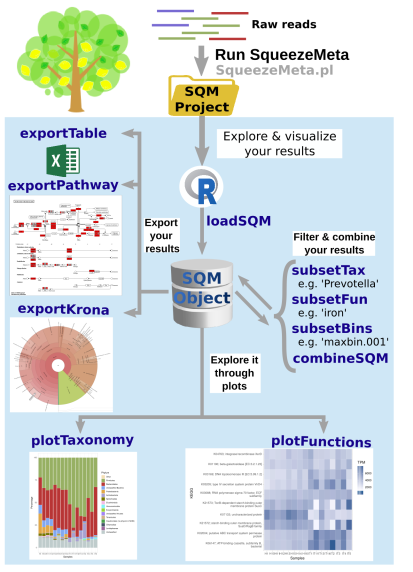
1) Integration with R:: We provide the SQMtools R package, which allows to easily load a whole SqueezeMeta project and expose the results into R. The package includes functions to select particular taxa or functions and generate plots, as well as bindings for other popular microbiome analysis packages such as microeco and phyloseq. Additionally, the package exposes all the data generated by SqueezeMeta into R so it can be used with other third-party R packages or for custom analysis scripts. See examples here. SQMtools can also be used in Mac or Windows, meaning that you can run SqueezeMeta in your Linux server and then move the results to your own computer and analyze them there. See advice for this below.
2) Integration with the anvi’o analysis pipeline: We provide a compatibility layer for loading SqueezeMeta results into the anvi’o analysis and visualization platform (http://merenlab.org/software/anvio/). This includes a built-in query language for selecting the contigs to be visualized in the anvi’o interactive interface. See examples here.
We also include utility scripts for generating itol and pavian -compatible outputs.
Analyzing SqueezeMeta results in your desktop computer
Many users run SqueezeMeta remotely (e.g. in a computing cluster). However it is easier to explore the results interactively from your own computer. Since version 1.6.2, we provide an easy way to achieve this.
1) In the system in which you ran SqueezeMeta, run the utility script sqm2zip.py with
sqm2zip.py /path/to/my_project /output/dir
, where /path/to/my_project is the path to the output of SqueezeMeta, and
/output/dir an arbitrary output directory.
2) This will generate a
file in /output/dir named my_project.zip, which contains the
essential files needed to load your project into SQMtools. Transfer this
file to your desktop computer.
3) Assuming R is present in your desktop computer, you can install SQMtools with:
if (!require("BiocManager", quietly = TRUE)) { install.packages("BiocManager")}
BiocManager::install("SQMtools")
This will work seamlessly in Windows and Mac computers, for Linux you may need to previously install the libcurl development library.
4) You can load the project directly from the zip file (no need for decompressing) with
import(SQMtools)
SQM = loadSQM("/path/to/my_project.zip")